Token Manager
Overview
The Token Manager is a comprehensive dashboard for managing custom tokens created by the connected wallet. It provides full control over token administration, including minting, burning, and transferring operations for fungible tokens on the Klever blockchain.
Page Header
- Title: "Token Manager"
- Description: "Manage your created tokens"
- Create Token Button: Quick access to create new tokens
Token Selection
Token Selector Dropdown
A comprehensive dropdown that displays detailed statistics for each token owned by the user:
- Token Name and Symbol: e.g., "My Token (MTK)"
- User Balance: Current balance of tokens in the connected wallet
- Max Supply: Maximum total supply that can be minted
- Minted Value: Total amount of tokens that have been minted
- Burned Value: Total amount of tokens that have been burned
- Circulating Supply: Current amount in circulation (minted - burned)
- Available Amount: Dynamic value based on the selected operation tab
Empty State
When no tokens have been created:
- Message: "You haven't created any tokens yet"
- Call to Action: "Create Token" button to start the creation process
Token Operations
The Token Manager provides four main operation tabs for token administration. The interface adapts responsively, switching from tabs to a grid layout on mobile devices.
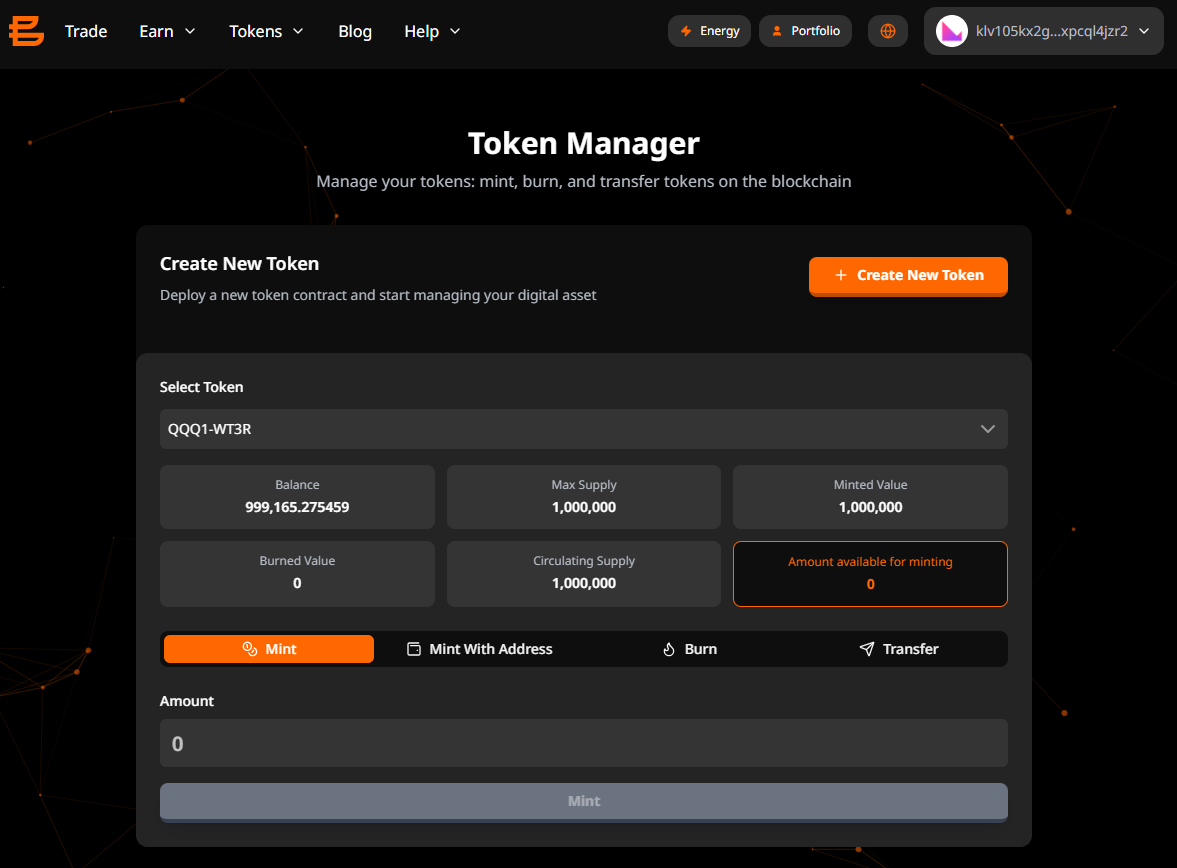
1. Mint
Purpose: Create new tokens and send them to the connected wallet
Fields:
- Amount: Quantity of tokens to mint
- Validation: Cannot exceed available minting capacity
- Available Capacity:
maxSupply - circulatingSupply
Process:
- Enter the amount to mint
- Click "Mint Tokens"
- Sign the transaction in your wallet
- Monitor transaction progress in real-time
- View transaction hash upon completion
Smart Contract: mintTransaction(amount, tokenSCAddress)
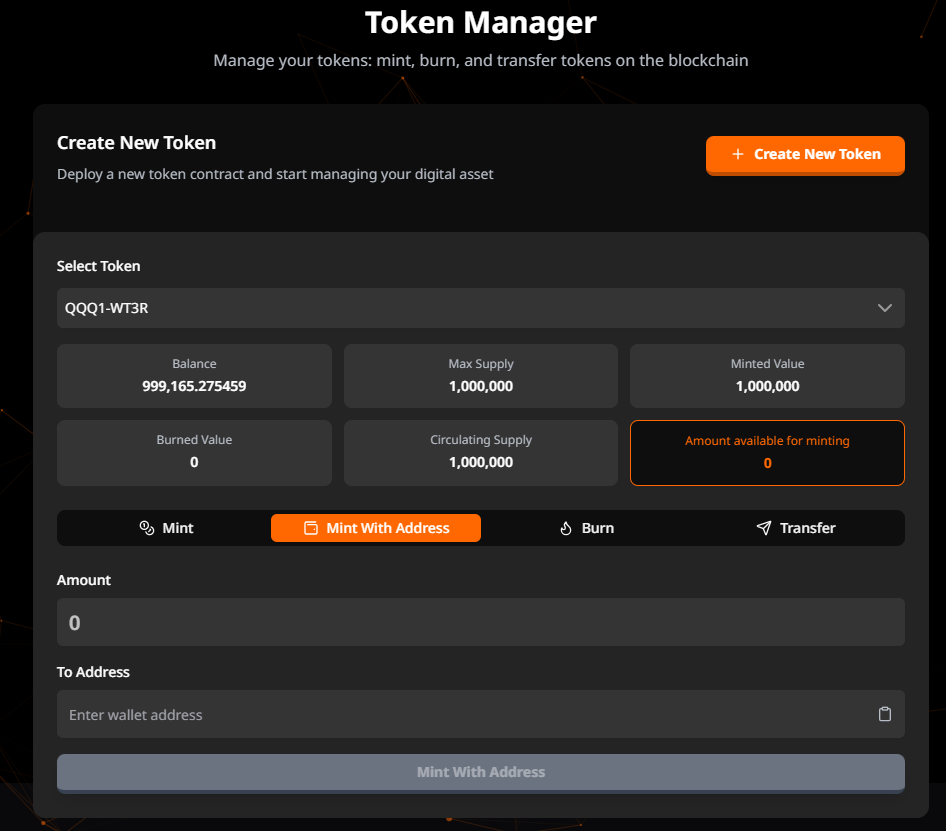
2. Mint with Address
Purpose: Create new tokens and send them to a specific address
Fields:
- Amount: Quantity of tokens to mint
- Validation: Cannot exceed available minting capacity
- Available Capacity:
maxSupply - circulatingSupply
- Recipient Address: Blockchain address to receive the tokens
- Clipboard paste support
- Address format validation
Process:
- Enter the amount to mint
- Enter or paste the recipient address
- Click "Mint Tokens"
- Sign the transaction in your wallet
- Monitor transaction progress in real-time
- View transaction hash upon completion
Smart Contract: mintWithAddressTransaction(amount, toAddress, tokenSCAddress)
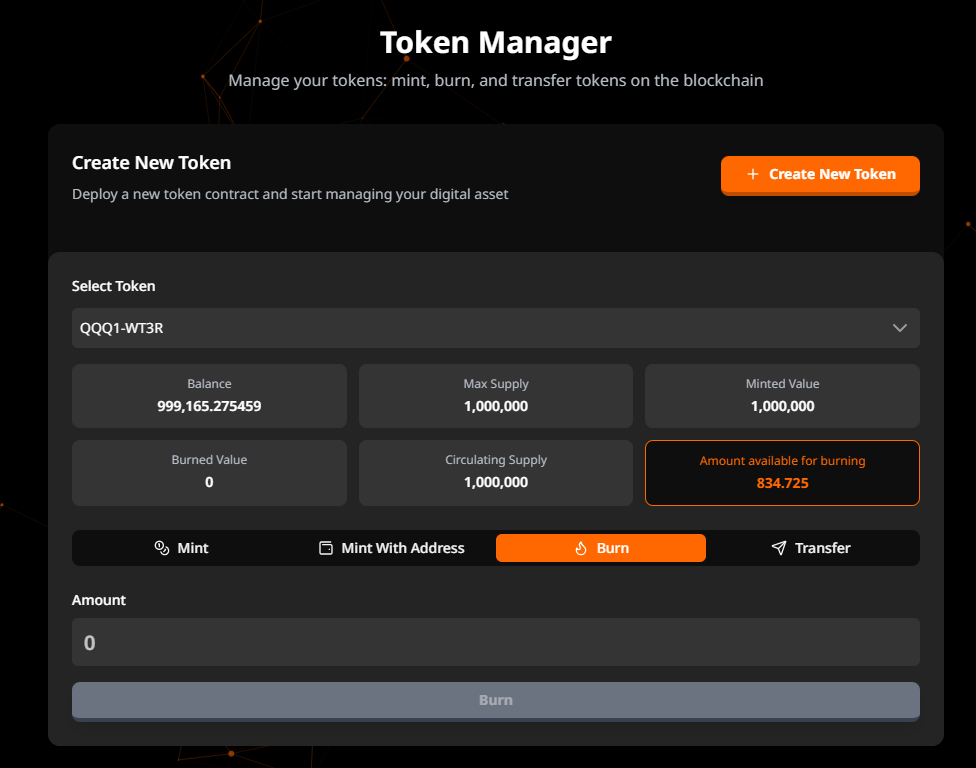
3. Burn
Purpose: Permanently destroy tokens from circulation
Requirements:
- Only available for fungible tokens (tokenNonce = 0)
- Tokens must be in the connected wallet
Fields:
- Amount: Quantity of tokens to burn
- Validation: Cannot exceed available burn capacity
- Available Capacity:
circulatingSupply - userBalance
Process:
- Enter the amount to burn
- Click "Burn Tokens"
- Sign the transaction in your wallet
- Monitor transaction progress in real-time
- View transaction hash upon completion
Smart Contract: burnTransaction(amount, nonce, tokenSCAddress)
Important Note: Burning tokens is irreversible and reduces the circulating supply permanently.
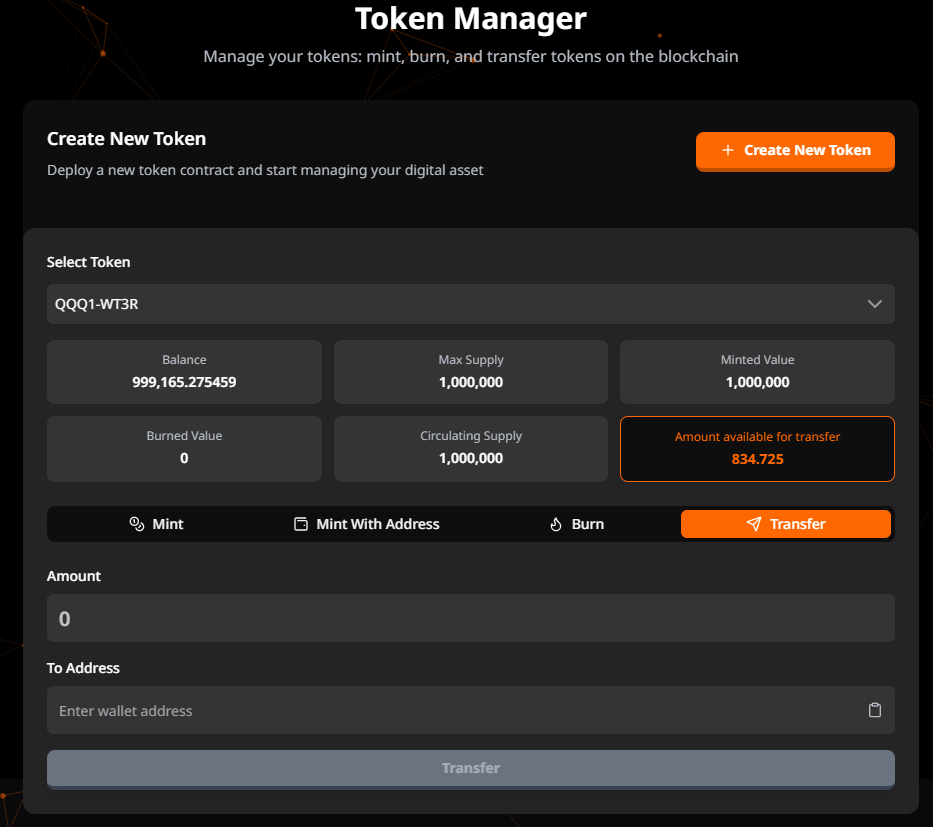
4. Transfer
Purpose: Transfer token ownership to another address
Fields:
- Amount: Quantity of tokens to transfer
- Validation: Cannot exceed user balance
- Available Capacity: User's current balance
- Recipient Address: Blockchain address to receive the tokens
- Clipboard paste support
- Address format validation
Process:
- Enter the amount to transfer
- Enter or paste the recipient address
- Click "Transfer Tokens"
- Sign the transaction in your wallet
- Monitor transaction progress in real-time
- View transaction hash upon completion
Smart Contract: transferTransaction(amount, toAddress, nonce, tokenSCAddress)
Token Statistics Display
Each operation tab displays contextual statistics:
- Current Operation: Highlighted tab showing the active operation
- Available Amount: Dynamic calculation based on operation type
- Mint: Shows remaining mintable amount
- Burn: Shows burnable amount
- Transfer: Shows user balance
- Real-time Updates: All statistics update after successful transactions
Transaction Monitoring
All operations include real-time transaction monitoring:
- Transaction Progress: Visual progress indicator
- Status Updates: Step-by-step transaction status
- Transaction Hash: Clickable link to view on blockchain explorer
- Success/Error Messages: Clear feedback for all operations
User Interactions
-
Selecting a Token:
- Click the token selector dropdown
- Review token statistics
- Select the desired token for management
-
Minting Tokens:
- Select "Mint" or "Mint with Address" tab
- Enter the amount (and address if applicable)
- Review available minting capacity
- Confirm transaction in wallet
-
Burning Tokens:
- Select "Burn" tab
- Enter the amount to burn
- Confirm the irreversible action
- Sign transaction in wallet
-
Transferring Tokens:
- Select "Transfer" tab
- Enter amount and recipient address
- Verify recipient address
- Sign transaction in wallet
Technical Implementation Notes
Smart Contract Integration
All operations are handled through functions located in:
/src/services/smart-functions/token-manager.js
Available Functions:
mintTransaction(amount, tokenSCAddress)mintWithAddressTransaction(amount, toAddress, tokenSCAddress)burnTransaction(amount, nonce, tokenSCAddress)transferTransaction(amount, toAddress, nonce, tokenSCAddress)
Transaction Flow
- Client-side Validation: Form validation before submission
- Value Formatting: Precision formatting based on token decimals
- Smart Contract Call: Transaction sent to blockchain
- Transaction Monitoring: Real-time status via
monitorTransaction() - UI Updates: Automatic refresh of token statistics
- Transaction Hash Display: Link to blockchain explorer
State Management
- Dynamic capacity calculations for each operation type
- Real-time balance updates after transactions
- Prevention of duplicate transaction submissions
- Persistent token selection across tab changes
Validation Rules
- Amount Fields: Must be greater than 0 and not exceed available capacity
- Address Fields: Must match blockchain address format
- Token Selection: Required before any operation
- Nonce Validation: Burn operations require tokenNonce = 0
User Experience Considerations
- Clear error messages with specific validation feedback
- Clipboard paste functionality for addresses
- Responsive design (tabs → grid on mobile)
- Loading states during transaction processing
- Transaction hash always displayed for verification
- Multi-language support via i18next
Security Best Practices
- Client-side validation before blockchain submission
- Clear confirmation for irreversible operations (burn)
- Address validation to prevent sending to invalid addresses
- Capacity checks to prevent exceeding limits
- Secure transaction signing through wallet extension
Current Limitations
- Only fungible tokens are fully supported
- Maximum of 8 decimal places for token precision
- Operations limited to tokens created by the connected wallet