LP List
Overview
The Pools List page displays all available liquidity pools in the DeFi platform, allowing users to view and interact with different trading pairs.
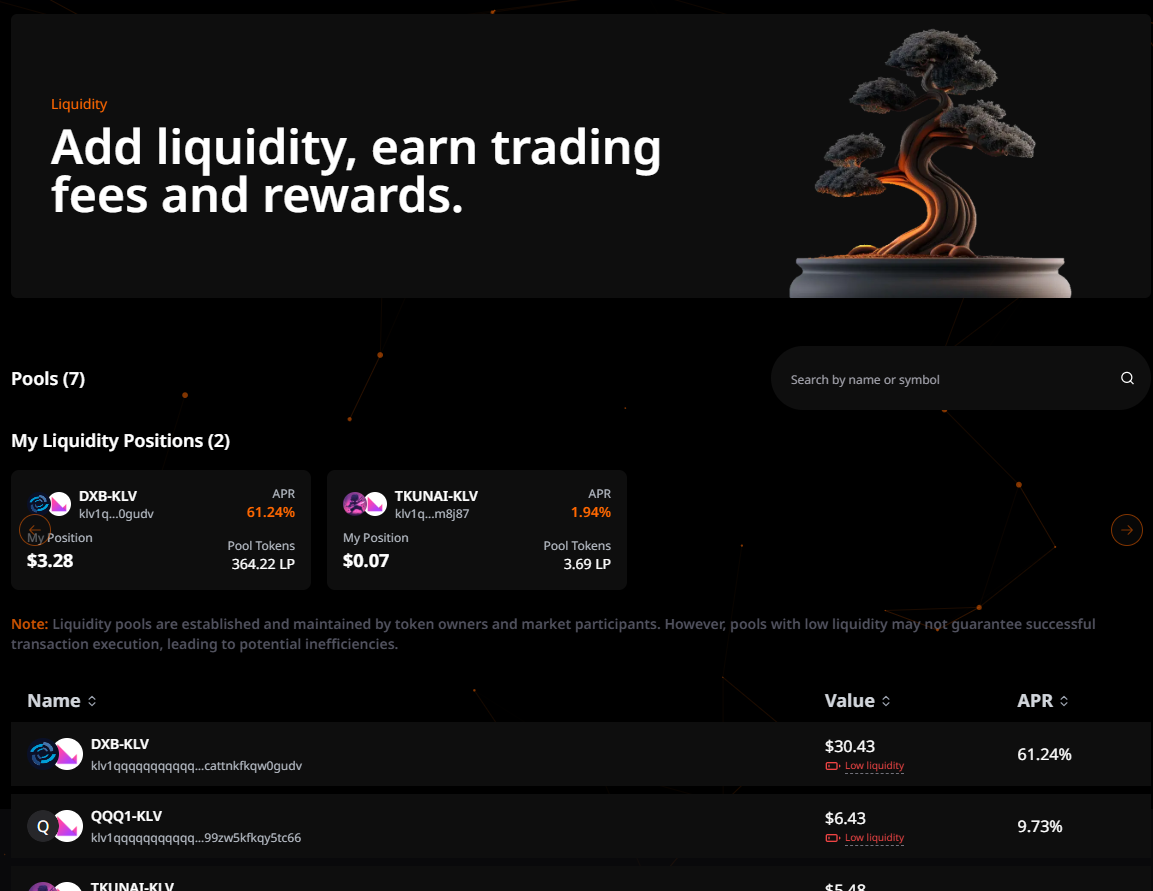
My Liquidity Positions
When a wallet is connected and the user has active liquidity positions, a dedicated carousel section appears at the top of the page, providing quick access to their existing pools.
Display Behavior
- Visibility: Only appears when:
- A wallet is connected to the platform
- The user has at least one active liquidity position
- Location: Positioned above the general pools table for easy access
- Purpose: Quick overview of user's investments before browsing all available pools
Carousel Layout
The My Liquidity Positions section features:
- Horizontal Scroll: Swipeable carousel for easy navigation through multiple positions
- Navigation Arrows: Left/right arrows for desktop navigation
- Card Design: Each pool displayed as a compact, informative card
- Card Dimensions: 300px width × 120px height per card
- Visual Style: Dark accent background with hover effects
- Position Count: Header displays total number of positions (e.g., "My Liquidity Positions (3)")
Pool Card Information
Each liquidity position card displays comprehensive information:
Header Section
- Token Icons: Overlapping avatars showing both tokens in the trading pair
- Pool Name: Trading pair identifier (e.g., "KFI-KLV")
- Smart Contract Address: Truncated contract address for reference (e.g., "klv1...mrmd")
- APR: Annual Percentage Rate displayed prominently in primary color
Footer Section
- My Position: Current value of user's position in USD (e.g., "$19.85")
- Pool Tokens: Amount of LP (Liquidity Provider) tokens owned (e.g., "1.54 LP")
Data Sources
The carousel combines data from two sources:
- Portfolio API: Provides user-specific data
- Position value in USD
- LP tokens owned
- Unclaimed rewards
- Pools API: Provides pool metadata
- Token icons and names
- Current APR
- Pool contract address
This merged data ensures users see both their personal position details and current pool performance metrics.
User Interactions
Click to Navigate
- Action: Click any pool card
- Destination: Redirects to pool details page (
/pools/{scAddress}/add) - Purpose: Allows users to:
- Add more liquidity to existing position
- View detailed pool information
- Access pool management options
Key Differences: My Positions vs All Pools
| Feature | My Liquidity Positions | All Pools Table |
|---|---|---|
| Visibility | Wallet connected + positions | Always visible |
| Display Format | Horizontal carousel | Vertical table |
| Data Focus | User's personal positions | All available pools |
| Information Shown | Position value, LP tokens | Pool TVL, general APR |
| Searchable | No | Yes |
| Sortable | No | Yes (by name, value, APR) |
| User-specific Data | ✅ Shows personal metrics | ❌ General pool info only |
Benefits
- Quick Access: Immediately see all positions without navigating to portfolio
- At-a-Glance Value: Track total invested liquidity across pools
- Performance Monitoring: Compare APRs of current positions
- Easy Management: One-click access to add more liquidity
- Visual Organization: Carousel format prevents page clutter
Search Functionality
- Search bar located at the top of the table
- Placeholder text: "Search by name or symbol"
- Real-time filtering as users type
- Case-insensitive search
Pools Table
The All Pools table displays every available liquidity pool on the platform, allowing users to discover new opportunities beyond their existing positions.
Table Structure
- Name column: Displays pool pair names (e.g., KFI-KLV) with token icons
- Value column: Shows pool's total value in USD
- APR column: Displays Annual Percentage Rate
Table Features
- Clickable rows for pool selection
- Pagination with 10 items per page
- Navigation controls (Previous/Next)
Pool Entry Information
Each pool entry displays:
- Pool pair icons
- Trading pair name
- Pool contract address (truncated)
- Current pool value in USD
- Current APR percentage
User Interactions
-
Pool Selection
- Users can click any pool row to access the liquidity provision interface
- Selection redirects to the pool's detailed page
-
Search and Filter
- Users can search pools by name or symbol
- Results update in real-time as users type
-
Pagination
- Users can navigate between pages
- Option to select number of rows per page
Table Data Example
| Name | Value | APR |
|---|---|---|
| KFI-KLV | $1,483.58 | 5.00% |
| FRG-KLV | $89.78 | 4.50% |
| ROY-KLV | $167.31 | 12.00% |