Security Audit
Overview
The Security Audit page serves as a transparency hub, demonstrating the platform's security credentials through third-party audits and certifications. It provides users with access to comprehensive security audit reports and displays official security certifications.
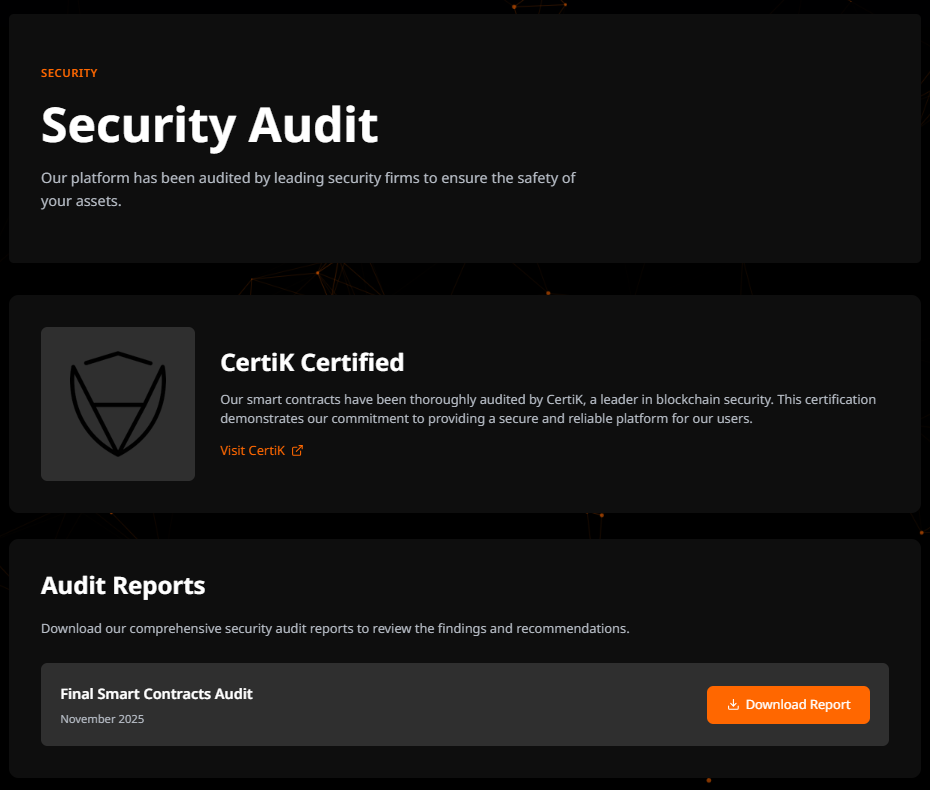
Page Structure
Hero Section
- Subtitle: "Security"
- Style: Uppercase, primary color, tracking-wider
- Purpose: Page categorization
- Title: "Security Audit"
- Style: text-4xl md:text-6xl, font-bold
- Responsive sizing for mobile and desktop
- Description: Commitment statement to platform security
CertiK Certification Section
Visual Elements
- CertiK Logo: 120x120px high-quality image
- Rendered using Next.js Image component
- Optimized for performance
- Alt text for accessibility
Content
- Section Title: "CertiK Certification"
- Description: Overview of the CertiK security certification
- External Link: Direct link to CertiK website
Audit Reports Section
Section Header
- Title: "Audit Reports"
- Description: Information about available security audit documentation
Reports List
The section displays a list of downloadable audit reports with the following structure:
Report Card Components:
- Report Name: Title of the audit report
- Report Date: Date when the audit was completed
- Download Button: Button to download the report
User Interactions
1. Viewing Certification
- User scrolls to CertiK Certification section
- Views CertiK logo and certification details
- Can click external link to verify certification on CertiK website
2. Downloading Audit Reports
- User navigates to Audit Reports section
- Reviews available reports by name and date
- Clicks "Download Report" button
- PDF file downloads to user's device
- User can review full audit details offline
3. External Verification
- Click on "Visit CertiK" link
- New tab opens with CertiK website
- User can independently verify platform's security certification
- User can view additional security metrics on CertiK platform