Trade
Overview
The Trade page provides a streamlined interface for swapping tokens. Users can specify the token and amount they want to trade, and see in real-time what they will receive in return based on current exchange rates.
Token Price Carousel
The Trade page now features a token price carousel at the top, displaying real-time price information for various tokens in a horizontally scrollable format.

Features
- Real-time Prices: Live token prices updated automatically
- Multiple Tokens: Display of various tokens with their current values
- Percentage Changes: Color-coded price change indicators showing gains (green) and losses (red)
- Asset IDs: Clear identification of each token with their respective asset IDs
- Horizontal Scroll: Easy navigation through different tokens using swipe or scroll gestures
- Visual Design: Clean, card-based layout for easy reading and comparison
Token Information Display
Each token card in the carousel shows:
- Token icon and symbol
- Asset ID for reference
- Current price in USD
- Percentage change with directional indicator
- Color coding for quick visual reference of performance
Token Information Card
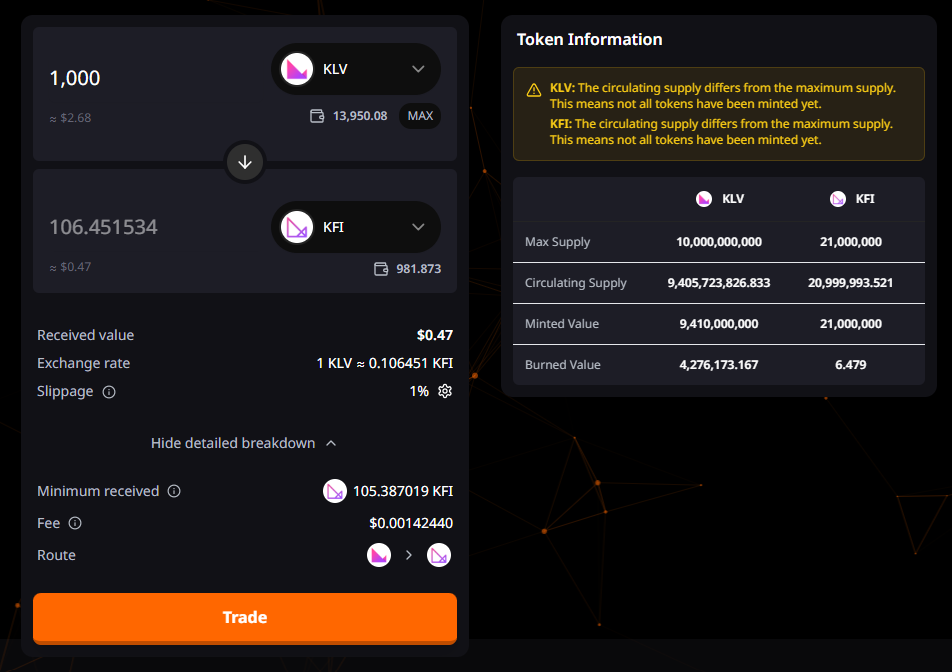
The Token Information Card provides a detailed side-by-side comparison of the selected tokens' supply metrics, helping users make informed trading decisions.
Purpose
This component displays comprehensive information about both tokens in the swap, including supply statistics and minting/burning history. It serves as a transparency tool to help users understand the tokenomics of the assets they're trading.
Display States
Empty State
When no tokens are selected, the card displays a centered message prompting users to select tokens to view detailed information.
Loading State
While fetching token data from the blockchain, skeleton loaders are shown for each metric to provide visual feedback during data retrieval.
Active State
When tokens are selected and data is loaded, a comprehensive comparison table is displayed with real-time metrics.
Metrics Displayed
The information card shows the following metrics for each selected token:
- Max Supply: The maximum total supply cap defined when the token was created
- Circulating Supply: The current amount of tokens actively in circulation (minted - burned)
- Minted Value: The total amount of tokens that have been minted since creation
- Burned Value: The total amount of tokens that have been permanently destroyed
All values are automatically formatted based on the token's precision and displayed with proper number formatting for readability.
Supply Mismatch Warning
The card includes an intelligent warning system that alerts users when there's a discrepancy between a token's max supply and circulating supply:
- Visual Alert: Yellow warning banner with alert triangle icon
- Token-specific Messages: Individual warnings for each token with supply mismatch
- Risk Awareness: Helps users identify potential risks such as:
- Tokens with significant burned supply
- Tokens that haven't reached max supply yet
- Unusual tokenomics that may affect trading
The warning appears automatically when maxSupply ≠ circulatingSupply for either token.
Layout and Design
Table Structure:
- 3-column grid layout (metric label + token 1 + token 2)
- Header row with token avatars and asset IDs
- Four data rows with metrics
- Responsive design with proper spacing
Visual Elements:
- Token avatars with fallback to asset ID
- Secondary background color for card container
- Tertiary background for the data table
- Border separators between rows
- Consistent text sizing and alignment
Responsive Behavior:
- Maximum width of 480px
- Centered layout with proper padding
- Mobile-optimized spacing
- Minimum height maintained for consistent UI
Technical Implementation
Data Fetching:
- Uses
useGetAssetByChainhook to fetch token data from blockchain - Separate queries for each token with independent loading states
- Real-time updates when token selection changes
Number Formatting:
- Values are deformatted using token precision:
deformatByPrecision(value, precision) - Formatted for display using:
formatNumber()utility - Handles large numbers with proper comma separation
Conditional Rendering:
- Empty state when no tokens selected
- Warning state when supply mismatch detected
- Loading state during data fetch
- Graceful handling of missing data with '-' placeholder
User Experience Benefits
- Informed Trading: Users can assess token health before executing swaps
- Transparency: Clear visibility into token supply metrics
- Risk Awareness: Automatic warnings for unusual tokenomics
- Visual Comparison: Side-by-side metrics make it easy to compare tokens
- Real-time Data: Information updates as token selection changes
Token Input and Output
From Token (Input)
- Input field for entering amount to trade (e.g., "1")
- Token selector with icon and symbol (e.g., "KFI")
- USD equivalent value display (e.g., "≈ $42.77")
- Balance information with MAX button to quickly use maximum available amount
- Dropdown to select different input tokens
To Token (Output)
- Display field showing amount to be received (e.g., "15,441.387641")
- Token selector with icon and symbol (e.g., "KLV")
- USD equivalent value display (e.g., "≈ $42.77")
- Balance information
- Dropdown to select different output tokens
Swap Direction
- Arrow button between input and output fields to reverse the swap direction
Trade Details
Basic Trade Information
- Received value: Total value of the trade in USD (e.g., "$42.77")
- Exchange rate: Conversion rate between tokens (e.g., "1 KFI = 15441.387641 KLV")
- Slippage: Tolerance for price changes during transaction execution (e.g., "1%")
- Settings gear icon to adjust slippage tolerance
Detailed Breakdown (Expandable)
- Minimum received: Minimum token amount to be received after slippage (e.g., "15286.973765 KLV")
- Fee: Transaction fee amount (e.g., "$0.12830841")
- Route: Trading path visualization showing token icons
Action Button
- Trade: Button to execute the swap transaction
Technical Implementation Notes
Token Price and Liquidity
- Real-time price data pulled from liquidity pools
- Automatic routing to find the best exchange rates
- Price impact calculations based on trade size
Slippage Protection
- Configurable slippage tolerance to protect trades from price movements (1%, 2% and 5%)
- Minimum received amount calculated based on slippage setting
- Transaction reverts if minimum amount cannot be received
Fee Calculation
- Transparent fee display showing exact costs
- Fee breakdown between protocol fee, liquidity provider fee, etc.
User Experience Considerations
- Responsive design for all screen sizes (minimum width 375px)
- Real-time token price updates
- Input validation to prevent invalid trade amounts
- Balance checking to prevent insufficient funds errors
- Gas estimation for transaction planning
Mobile Experience
- Touch-friendly input controls
- Simplified UI for smaller screens
- Accessible token selectors optimized for touch
Error Handling
- Clear error messages for common issues:
- Insufficient liquidity
- Price impact too high
- Insufficient balance
- Network errors