Bridge
Overview
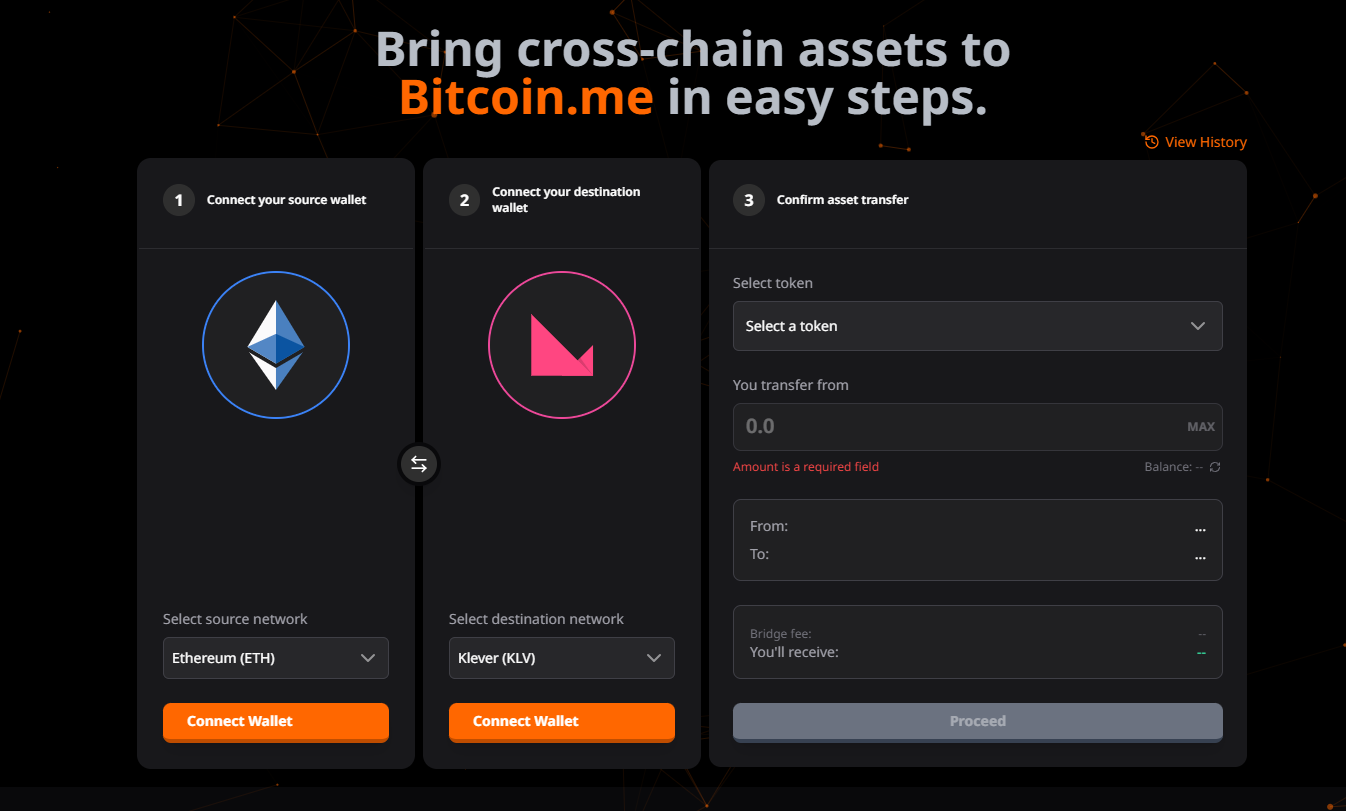
The Bridge functionality allows users to transfer tokens between Klever (KLV) and Ethereum (ETH) networks securely and efficiently. The interface guides the user through a step-by-step flow, ensuring clarity and safety at every stage of the cross-chain transaction.
Usage Flow
The bridging process is divided into clear steps to minimize errors and provide constant feedback to the user.
1. Network Selection and Wallet Connection
The first step is to define the transfer direction and connect the necessary wallets.
- Network Selection: The user chooses the Source Chain and the Destination Chain.
- Example: From Ethereum To Klever.
- Wallet Connection:
- For the source network, it is necessary to connect the wallet holding the funds (e.g., MetaMask for Ethereum, Klever for Ethereum).
- For the destination network, the user can connect their Klever wallet to automatically fill in the address or manually enter an address.
- Visual Feedback: The interface shows colored rings indicating the connection status (Green for connected, Gray for disconnected).
2. Transaction Details
In this step, the user defines what will be transferred.
- Token Selection: Based on the selected networks, the interface displays only the tokens compatible for bridging.
- Amount Input: The user enters the amount to be transferred.
- The system automatically validates if there is sufficient balance.
- "MAX" button to transfer the entire available balance.
- Fee Calculation:
- Bridge Fee: Fee charged by the bridge service.
- Estimated Received: Net amount the user will receive on the destination network.
- The send button remains disabled if the transfer amount is less than the fees.
3. Confirmation and Status
After initiating the transfer, a modal tracks the operation progress in real-time:
- Building: Preparing the transaction.
- Approval (ETH Only): Requesting permission for the Bridge contract to spend the tokens (requires wallet signature).
- Deposit/Submission: Effectively sending the tokens to the Bridge contract.
- Processing: The system waits for the necessary block confirmations (security).
- Completed: The transfer has been successfully concluded, and the funds released on the destination network.
Links to block explorers (KleverScan and Etherscan) are provided so the user can verify the transaction on the blockchain.
Important Points
[!WARNING] Always make sure to check the destination address. Blockchain transactions are irreversible.
- Processing Time: The total time depends on the congestion of the networks (Ethereum and Klever).
- Gas Fees: In addition to the Bridge fee, the user must have a balance in the native currency of the source network (ETH on Ethereum or KLV on Klever) to pay for the transaction Gas Fees.